Inside Our Classification Pipeline: Computer Vision, Embeddings, and Similarity Scoring
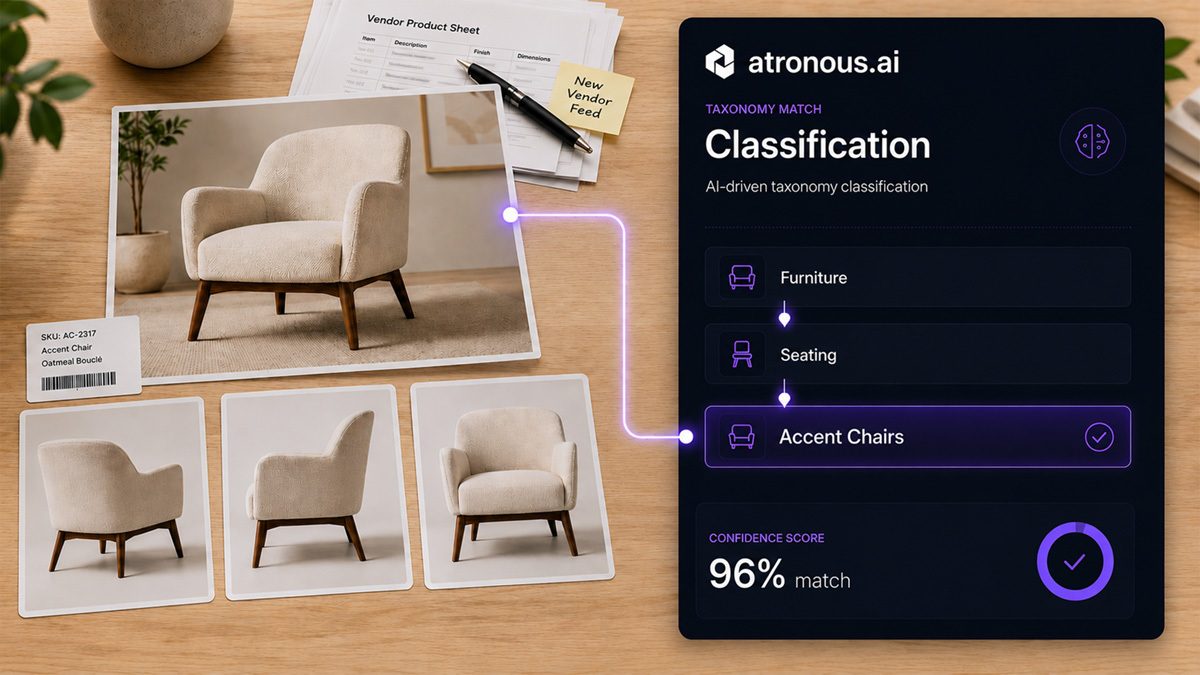
In the ever-evolving world of eCommerce, organizing and classifying products correctly is essential, not only for smooth navigation and discovery but also for maximizing conversion rates. Recently, atronous.ai deployed an advanced machine learning pipeline that brings automation, intelligence, and precision to product taxonomy assignments, reducing manual effort and inconsistencies.
New to this problem? Product Taxonomy: How to Classify Products into the Right Category is the primer. This post is the engineering detail underneath it.
The Challenge: From Chaos to Classification
Retailers often receive product data in various formats, images, URLs, spreadsheets, or PDFs, from a wide range of vendors. These items lack standardized taxonomies or come with misaligned categories that do not fit the retailer’s existing classification system. This leads to a fragmented shopping experience and lost revenue opportunities.
Step 1: Identifying the Object from an Image URL
Using advanced computer vision models, the platform ingests product image URLs and identifies the object type in the photo. For example, in a recent engagement with a leading retailer, the platform processed entries such as product image URLs.
Using a combination of convolutional neural networks (CNNs) and pretrained models (like CLIP or BLIP), the system outputs a probable object class like Armchair, Sofa, or Barstool, without any manual labeling.
Step 2: Training on the Retailer’s Current Taxonomy
What makes atronous truly adaptive is its ability to learn from a retailer’s own classification structure. By training on the existing taxonomy tree, whether pulled from a Shopify store, ERP system, or internal database, the ML engine understands how categories are organized and how products typically flow through them.
For this retailer’s use case, atronous automatically mapped these detected objects to specific categories such as:
- Furniture → Seating → Armchairs
- Furniture → Living Room → Sofas
- Furniture → Dining → Barstools
Step 3: Assigning the Best Taxonomy Match
Once trained, the system uses similarity scoring between image embeddings and taxonomy embeddings to assign each product to the most appropriate category.
For instance:
- An image classified as Barstool with mid-century aesthetics was assigned to Furniture > Dining > Barstools with over 95% confidence.
- A decorative stool misclassified in the source data was automatically reclassified as an Accent Piece based on visual and semantic similarity.
This not only improves classification accuracy but allows the taxonomy to adapt dynamically to the retailer’s style and structure.
Bonus Step: Taxonomy Auditing and Alternative Suggestions
In a powerful fourth step, atronous audited the current taxonomy assignments and flagged inconsistencies or misclassifications. It also suggested potential improvements.
For example:
- Products categorized under Chairs that visually match Recliners were highlighted.
- Items split across Living Room Decor and Accent Chairs were recommended for consolidation or reclassification.
These suggestions are provided in an easy-to-review spreadsheet or directly synced into PIM systems.
The Impact
This AI-first approach has changed how retailers handle product onboarding:
- A sharp reduction in manual taxonomy assignment time
- Higher categorization accuracy, with uncertain matches flagged for review instead of guessed
- Improved shopper experience through cleaner navigation and product grouping
As product catalogs grow and become more complex, automation like this is not just helpful, it becomes mission critical.
Ready to Streamline Your Taxonomy?
atronous.ai is bringing intelligence to the very core of digital merchandising. If your team is struggling with inconsistent categorization, long onboarding cycles, or broken product feeds, we would be glad to help. See it on your own data with a free Data Quality Score.